ECS Fargate or EKS: the same container deployed both ways, with the bill
The eight questions that decide the platform before any benchmark, two Terraform stacks for the same service, the bill at 2, 10 and 50 services from published prices, and where EKS earns its keep.

Praveen Kumar
Founder & Technology Leader
On this page
The team has outgrown a few EC2 instances, someone has proposed Kubernetes, and the CTO cannot tell whether that is the right call or a résumé-driven one. Every comparison online is a vendor page or a feature matrix. Nobody shows the bill.
Here is my position after running both for clients of very different sizes. Below roughly fifteen to twenty services, and without a dedicated platform engineer, ECS on Fargate is the better choice on total cost of ownership. EKS earns its place when you need Kubernetes operators for stateful systems, GPU scheduling, portability to on-premises or another cloud, or network-policy granularity for a regulated boundary. The rest of this article is the decision framework, the two Terraform stacks that deploy the same service both ways, and a cost model built only from published prices with every assumption visible.
Everything is in the engineering notes repository: the reference service, the shared network, both stacks, the Kubernetes manifests, the k6 load profile and the timing scripts.
Eight questions before any benchmark
Answer these honestly and the platform usually chooses itself.
- How many services, now and in eighteen months? Under twenty, Fargate's per-task simplicity wins. Past fifty, Kubernetes' scheduling and tooling start paying back their overhead.
- Who will operate it? Fargate needs a developer who can read a task definition. EKS needs someone who understands Kubernetes upgrades, networking and admission control, even with Auto Mode handling nodes.
- Do you need operators? Databases, Kafka, search clusters and ML platforms ship Kubernetes operators. If you intend to run those yourself, that is an EKS argument. If you use managed services for them, it is not.
- GPUs? Fargate has no GPU tasks as of October 2026. GPU workloads on ECS mean EC2 or ECS Managed Instances; on EKS, Auto Mode schedules GPU and Trainium families.
- Portability? A workload that must also run on-premises or on another cloud wants Kubernetes as the portable layer. A workload that will live on AWS does not need to pay for portability it will never use.
- Network policy granularity? Regulated boundaries that require pod-level network policy and service mesh features favour EKS. Security groups per task cover most everything else.
- Existing experience? A team that already runs Kubernetes well should keep doing so. The learning curve is sunk.
- Deployment style? ECS now has built-in blue/green, linear and canary deployments with lifecycle hooks and alarm-based rollback. If you expected to adopt Kubernetes for progressive delivery, that reason is gone.
If questions 3 to 6 are all "no", stop here and use Fargate.
The reference workload
To compare fairly, the same thing has to run on both. The repository's reference service is a small Node.js HTTP server that does a few milliseconds of hashing per request, so CPU-based autoscaling has something to react to, with a health endpoint and a version string so deployments can be timed. The shared Terraform stack provides one VPC, two public and two private subnets, one NAT gateway and an ECR repository; both platform stacks use it.
Stack A, ECS on Fargate: a cluster, an ARM task definition at 0.5 vCPU and 1 GiB with a container health check, a service in private subnets behind an Application Load Balancer, a deployment circuit breaker with rollback, and target-tracking autoscaling on CPU between one and ten tasks. About 230 lines of Terraform, eleven resources.
Stack B, EKS Auto Mode: a cluster with the general-purpose and system node pools, the built-in load balancer controller and block storage enabled, and two IAM roles with the managed policies Auto Mode requires. The workload is applied with kubectl: a Deployment with requests and limits, a Service, an IngressClass and Ingress that produce an ALB, and a HorizontalPodAutoscaler on CPU between one and ten replicas. About 120 lines of Terraform and 90 lines of YAML, but the cluster alone takes ten to fifteen minutes to create and carries the Kubernetes version lifecycle with it.
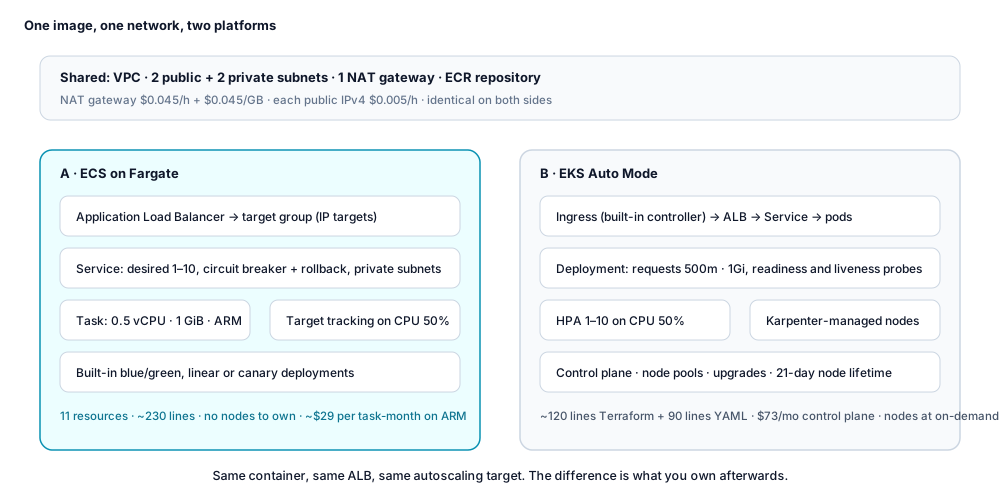
The resource counts understate the difference. The Fargate stack is complete: it is the whole platform. The EKS stack is the start of a platform: ingress classes, pod identity, upgrade policy, namespaces and admission rules follow, and someone owns them.
What to measure: push to serving, scale-out, rollback
The two stacks and the k6 ramp are written and validated, and the method below is what the scripts in the repository record. We have not run them in a live account for this article, so this section gives you the procedure rather than our numbers; run it and the figures come out dated and reproducible.
Three timings per platform, taken with the scripts in the repository:
- Push to serving: from pushing a new image tag to the load balancer returning the new version string from every target. On ECS this is a service update with the circuit breaker; on EKS a rolling Deployment update.
- Scale-out under load: k6 ramps from 20 to 400 requests per second over two minutes and holds for four. The script polls running task or ready pod counts every five seconds and records the time to reach ten. On EKS this includes Auto Mode provisioning a new node when the existing one is full, which is the number most teams are surprised by.
- Rollback: time for the previous version to be served again after a rollback is triggered.
Expect Fargate to win push-to-serving and rollback on raw time, because there is no node in the path, and expect EKS scale-out to show a step when a node has to be added. The interesting question is how large that step is with Auto Mode, which is exactly why it has to be measured rather than asserted.
The bill, from published prices
All prices are US East (N. Virginia), on-demand, as published on 5 October 2026. The model is deliberately simple so you can change one assumption and recompute.
Assumptions. A "service" is two replicas of 0.5 vCPU and 1 GiB on ARM, running all month (730 hours). Requests equal usage, so no bin-packing advantage is assumed for either side. One ALB and one NAT gateway serve the whole environment. Data transfer, logs and storage are listed separately and are the same on both platforms.
Unit prices.
| Item | Price |
|---|---|
| Fargate, ARM | $0.03238 per vCPU-hour, $0.00356 per GB-hour |
| Fargate, x86 | $0.04048 per vCPU-hour, $0.004446 per GB-hour |
| EKS control plane | $0.10 per hour ($73 a month); $0.60 per hour in extended support |
| EKS Auto Mode node fee | 12% of the instance's on-demand price, regardless of purchase option |
| m7g.large (2 vCPU, 8 GiB) | $0.0816 per hour, plus $0.00979 Auto Mode fee |
| Application Load Balancer | $0.0225 per hour plus $0.008 per LCU-hour |
| NAT gateway | $0.045 per hour plus $0.045 per GB processed |
| Public IPv4 address | $0.005 per hour, in use or idle |
| CloudWatch Logs ingestion | $0.50 per GB |
Per-service compute. On Fargate, one service costs 2 × (0.5 × 0.03238 + 1 × 0.00356) × 730 = $28.84 a month. On EKS Auto Mode with m7g.large nodes, each node costs $0.09139 an hour, $66.71 a month, and fits about three 0.5-vCPU pods once system pods and the kubelet reservation are taken out of its two vCPUs.
| Services | Fargate compute | EKS nodes needed | EKS compute + control plane | Shared items (both) |
|---|---|---|---|---|
| 2 | $58 | 2 (minimum for availability) | $133 + $73 = $206 | ALB about $22, NAT $33 plus data, two public IPs $7 |
| 10 | $288 | 7 | $467 + $73 = $540 | same |
| 50 | $1,442 | 34 | $2,268 + $73 = $2,341 | same, probably a second NAT for AZ redundancy |
The result surprises people who assume Kubernetes is cheaper. At list price, with identical requests, Fargate on ARM costs less per vCPU-hour ($0.0324) than an m7g.large on EKS Auto Mode ($0.0408 for the instance plus the 12% fee), and EKS adds the control plane on top. EKS pulls ahead on compute only when you do what Fargate cannot: pack bursty services tightly with requests below their peaks, run Spot capacity, or buy EC2 commitments. Note that the Auto Mode fee is charged on the on-demand price even when the instance is discounted, and that ECS Managed Instances, launched in 2025, carries the same 12% fee if you choose managed EC2 on ECS.
The forgotten lines. The NAT gateway is the one most teams miss: $33 a month per availability zone before a byte is processed, and $0.045 per GB after, which is why image pulls from ECR should go through a gateway endpoint. Every public IPv4 address, including the two on an ALB, is $3.65 a month. Interface VPC endpoints are $7.30 a month per endpoint per zone. These are the same on both platforms, and together they are often larger than the compute difference at two services.
For a GCP reader, Cloud Run's instance-based billing is $0.000018 per vCPU-second and $0.000002 per GiB-second in Tier 1 regions, which puts a 1 vCPU, 1 GiB instance at about $0.072 an hour, roughly 60% above Fargate ARM at list, with a generous free tier and no per-cluster fee. GKE Autopilot bills pods at $0.0445 per vCPU-hour and $0.0049 per GiB-hour, with the first zonal or Autopilot cluster's management fee free per billing account. The shape of the decision is the same.
Where EKS wins anyway
None of the above argues against Kubernetes where it belongs.
- Operators and stateful systems. If you run Postgres, Kafka or OpenSearch yourself with their operators, Kubernetes is the substrate they were built for.
- GPUs and accelerators. Auto Mode schedules GPU and Trainium instance families, and the fee on those was cut in mid-2026. Fargate has nothing here.
- Hybrid and portability. EKS Hybrid Nodes and plain Kubernetes manifests move; task definitions do not.
- Network policy and mesh. Pod-level network policy is built in; the ecosystem of meshes, gateways and admission controllers is unmatched.
- A team that already runs it well. The operating cost of Kubernetes is mostly learning, and a team past that cost should not pay it again in reverse.
Choosing Fargate now is not a trap
The objection to Fargate is always "but we will need Kubernetes later". Sometimes true, and the migration is not the cliff it is made out to be. The container image is identical. The ALB target group becomes an Ingress. Task definition CPU and memory become pod requests. Task IAM roles become pod identities. Service Connect becomes Kubernetes Services. Autoscaling policies become a HorizontalPodAutoscaler. A team that has kept its services twelve-factor on Fargate can move them one at a time behind the same load balancer, and the repository's two stacks are a worked example of exactly that mapping.
What does not move is the organisational cost: someone owns the cluster from the day it exists. Delay that day until the questions at the top say otherwise.
When this is wrong
A team with real Kubernetes operating experience should not downgrade to Fargate to save a control-plane fee. A product that must ship on GCP will find GKE Autopilot narrows the gap considerably. A workload that must run on-premises makes Kubernetes the portable layer and turns the question into which distribution. And a shop that intends to run its own databases on Kubernetes operators has already decided.
The checklist
- Answer the eight questions in writing, with the eighteen-month service count.
- Price both with your own numbers: replicas, sizes, ARM or x86, NAT data volume, log volume.
- Add the forgotten lines: NAT per zone, public IPv4, interface endpoints, logs.
- If Fargate: ARM where the image supports it, gateway endpoints for ECR and S3, built-in blue/green with alarm rollback, Compute Savings Plans once usage is steady.
- If EKS: Auto Mode unless you have a reason to manage nodes, an upgrade owner and cadence from day one, and a commitment strategy, because the Auto Mode fee does not shrink with discounts.
- Either way: keep services twelve-factor so the mapping in the previous section stays available.
The Terraform for both stacks, the manifests, the load profile and the measurement scripts are in the engineering notes repository.
Written by
Praveen Kumar
Use this article